9.1. Orphaned Resources
This lab demonstrates how to find orphaned top-level resources with Argo CD. Orphaned resources are not managed by Argo CD and could be potentially removed from cluster.
Task 9.1.1: Create application and project
argocd app create argo-$USER --repo https://github.com/acend/argocd-training-examples.git --path 'example-app' --dest-server https://kubernetes.default.svc --dest-namespace $USER
argocd app sync argo-$USER
Create new Argo CD project without restrictions for Git source repository (–src) nor destination cluster/namespace (–dest)
argocd proj create --src "*" --dest "*,*" apps-$USER
Enable visualization and monitoring of Orphaned Resources for the newly created project apps-<username>
argocd proj set apps-$USER --orphaned-resources --orphaned-resources-warn
Note
The flag--orphaned-resources enables the determinability of orphaned resources in Argo CD. After a refresh you will see them in the user interface on the project when selecting the checkbox Orphaned Resources.
With the flag --orphaned-resources-warn enabled, for each Argo CD application with orphaned resources in the destination namespace a warning will be shown in the user interface.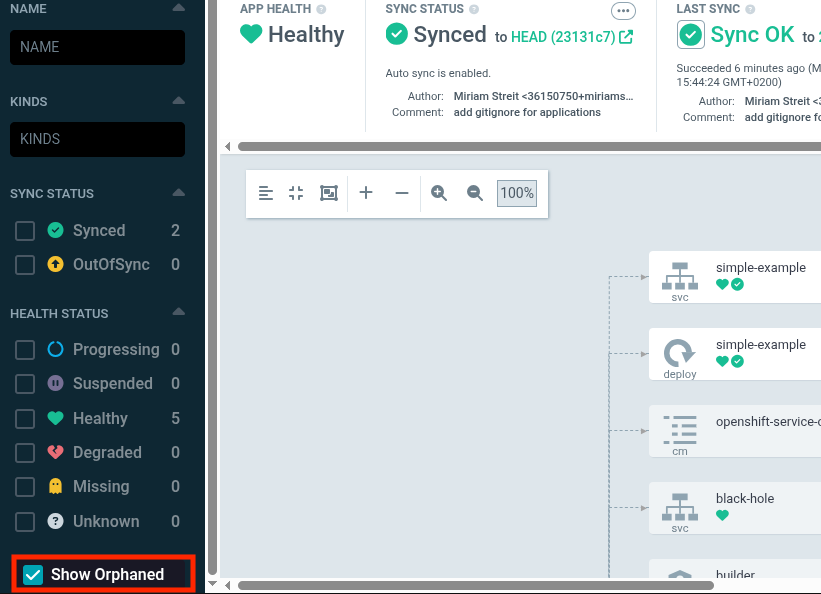
Assign the application to newly created project:
argocd app set argo-$USER --project apps-$USER
Ensure that the application is now assigned to the new project apps-<username>
argocd app get argo-$USER
Refresh the application
argocd app get --refresh argo-$USER
Task 9.1.2: Create orphaned resource
Now create the orphan service black-hole in the same target namespace the Argo CD application has:
cat <<EOF | kubectl apply -f -
apiVersion: v1
kind: Service
metadata:
  name: black-hole
spec:
  ports:
  - port: 1234
    targetPort: 1234
EOF
Note
This service will be detected as orphaned resource because it is not managed by Argo CD. All resources which are managed by Argo CD are marked with the annotationargocd.argoproj.io/tracking-id per default.Print all resources:
argocd app resources argo-$USER
You see in the output that the manually created service black-hole is marked as orphaned:
GROUP  KIND        NAMESPACE    NAME            ORPHANED
       Service     <username>   simple-example  No
apps   Deployment  <username>   simple-example  No
       Service     <username>   black-hole      Yes
When viewing the details of the application you will see the warning about the orphaned resource
argocd app get --refresh argo-$USER
...
CONDITION                MESSAGE                               LAST TRANSITION
OrphanedResourceWarning  Application has 1 orphaned resources  2021-09-02 16:20:36 +0200 CEST
...
Task 9.1.3: Enable auto-sync and prune
Enable automated sync and pruning before deletion to ensure all managed resources are cleaned up:
argocd app set argo-$USER --sync-policy automated
argocd app set argo-$USER --self-heal
argocd app set argo-$USER --auto-prune
Task 9.1.4: Housekeeping
Clean up the resources created in this lab
argocd app delete argo-$USER -y
argocd proj delete apps-$USER
Find more detailed information about Orphaned Resources in the docs .